Humanitix for Hosts
- 4.9
- Rating
- 10.00K
- Installs
- Free
- Price

 Analysis by App-foxy
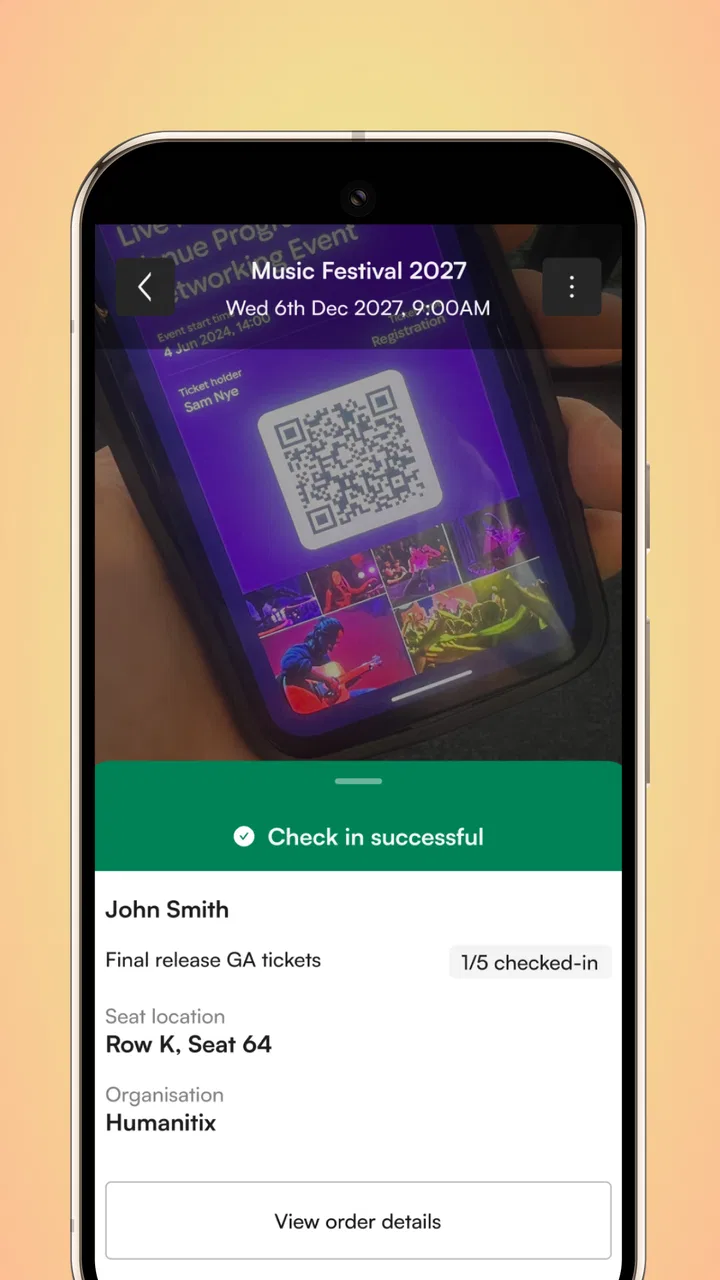
Running an event from a phone sounds simple until the doors open, guests arrive at different speeds, and the person responsible for the event suddenly has to make decisions while standing in the middle of the crowd. That is the situation Humanitix for Hosts is built around. I found it most useful as an on-the-day companion for people managing events through Humanitix, rather than as a general event-discovery app for attendees.
The app comes from Humanitix, sits in the events category, and is free to use. Its purpose is practical: help a host keep control of the event while the event is actually happening. That distinction matters. I would not choose it because I wanted a polished planning workspace, a social calendar, or a replacement for every part of an event-management system. I would choose it when the important work has moved from preparation to arrival, checking, coordination, and quick decisions.
My overall impression is that its value depends heavily on how well the event has been prepared before the day. When the setup is orderly, a host can use the phone as a focused operational tool. When the underlying event information is incomplete or the team has not agreed on responsibilities, the app cannot remove that confusion. It is strongest as a live event-control tool, not as a substitute for planning discipline.
You May Also Like

 Blood Strike: 2.5 Anniversary
Blood Strike’s Loadouts Turn Every Drop Into a Tactical Gamble
A close look at Blood Strike’s custom loadouts: how fast access to signature weapons reshapes its battle royale rhythm, rewards preparation, and narrows the gap between fights.

 Pandora - Music & Podcasts
Pandora’s Music Is Easy to Start, but Harder to Recover
Pandora’s strength is its low-effort path from a seed to a station. Its weak spot is how much confidence it asks you to place in connection, setup, and quiet recovery.

 8 Ball Pool
 Is Built on Rivalries, Rematches, and Routine
A close look at the rivalries, rematches, shared routines, and unanswered safety questions that turn a quick pool match into a persistent mobile community.

 Samsung Music
’s Quiet Strength Is Playing What You Already Own
Its reach comes less from spectacle than from dependable access to a personal library. That simplicity is both the app’s strongest retention engine and its ceiling.

 AccuWeather: Weather Radar
AccuWeather Review: A Quick, Clear Forecast for Everyday Decisions
For everyday plans, the best forecast is the one you can understand quickly. AccuWeather makes rain timing, radar, and local conditions easy to act on, with a few trade-offs.

 Hill Climb Racing
Why Hill Climb Racing Still Turns Crashes Into One More Run
A tiny car, a bumpy hill and one more upgrade: Hill Climb Racing keeps resurfacing because its simple chaos makes every near-miss feel personal.
More From Our News Desk



From event setup to a working entrance
I look at the move from event setup to a working entrance as a handoff, not just a change of screen: the organizer’s preparation has to become a clear routine for whoever is meeting guests. A quick rehearsal with the actual phone and the person covering exceptions can reveal confusion before it reaches the queue. That preparation also sets up the next question: what should I expect once arrivals begin to bunch together?
Starting with the right kind of event responsibility
The first question I would ask is not whether the app is free, but whether I am the person who needs to operate the event. Humanitix for Hosts is aimed at organizers and on-site staff. If I only want to buy a ticket, browse activities, or keep a personal itinerary, this is the wrong side of the Humanitix experience. The app makes sense when I have a host role and need event information close at hand.
That makes it a particularly natural fit for community gatherings, fundraisers, talks, workshops, performances, and other occasions where guests need to be admitted smoothly. It can also suit a small team that does not want every worker carrying a laptop. A phone is easier to move around with, especially when the entrance, registration table, and main room are not in the same place.
I would still prepare the event carefully before relying on the app. The phone should be charged, the person using it should know which event they are operating, and the team should agree on who handles exceptions. Those steps are not glamorous, but they determine whether the app feels like a helpful tool or one more source of pressure.
Preparing the host’s point of view
The most useful mental model is to treat the app as the host’s view of the event. Instead of asking it to do everything, I would use it to support the moments where a host needs immediate access to event operations. That keeps the workflow clear: prepare the event elsewhere as needed, open the host tool when the day begins, and use it to move people through the next stage.
This approach also prevents a common mistake: expecting a mobile host app to replace the event organizer’s complete administration process. A phone screen is excellent for quick actions and checking information. It is less comfortable for deep editing, long-form planning, or comparing many details at once. If I were organizing a complicated event with several ticket arrangements or a large staff, I would want the broader Humanitix setup and a clear team process behind the mobile app.
One practical tip is to decide in advance what counts as a normal arrival and what requires escalation. A guest who presents a valid ticket can follow the ordinary flow. A guest with a name mismatch, a duplicate-looking ticket, or a question about entry should not force the person at the door to improvise a policy. The app can support the check; it cannot decide your venue’s rules for you.
The first real handoff: from organizer to on-site operator
Event software often fails in the handoff between the person who created the event and the person who runs it. Humanitix for Hosts is most useful when that handoff is explicit. The organizer should tell the on-site operator which event to open, where the check-in point is, who can approve unusual cases, and what to do if the queue grows.
I would also give every staff member a narrow responsibility. One person can focus on the entrance, another can answer questions, and a third can deal with exceptions away from the queue. Even if the app is installed on more than one phone, the team should avoid repeatedly passing one device around. That creates delays and makes it harder to know who has already handled a guest.
This is one of the less obvious strengths of a host-focused app: it encourages the event team to think in operational stages. The app is not just something one organizer keeps for personal use. It can become the shared point of reference for the people turning an online booking into a real arrival.
What the arrival workflow feels like
On a typical event day, I would begin by opening the app before guests reach the entrance. I would confirm that I am looking at the intended event, position myself where the phone can be used comfortably, and keep the screen ready rather than searching through unrelated apps. The aim is to reduce every unnecessary pause once the queue starts.
As guests arrive, the host’s job becomes repetitive but important: receive the ticket or attendee information, check it through the available event workflow, and communicate the next step clearly. A smooth entrance is not only about speed. Guests need to know whether they can proceed, where to go next, and whom to ask if something does not look right.
This is where a small screen can be both helpful and limiting. It keeps the essential operation portable, but it also means I need to pay attention to brightness, glare, battery level, and the physical position of the phone. At an outdoor event, direct sunlight can be more troublesome than the software itself. At a busy indoor event, poor network conditions or a crowded reception area can create the more serious delay.
I would therefore avoid placing the only host phone behind a pile of paperwork or at the back of a long table. The person using it should be able to see the guest, the screen, and the next destination without turning the interaction into a conversation across a barrier. That sounds like venue advice, but it directly affects how well a mobile check-in workflow performs.
Handling the queue without losing the human side
A good host does not stare at the device for the entire interaction. I found the better rhythm is to look at the guest first, ask for the ticket or relevant details, use the app, and then give a definite answer. “You’re all set” is more useful than silently tapping while the guest waits for a signal that the process is complete.
For a small event, one person may be able to check arrivals and answer questions. For a busier event, those jobs should be separated. The app can handle the operational check, while another team member explains seating, accessibility, refreshments, or the venue layout. This division is a concrete advantage of using a mobile tool: the check-in operator can remain focused instead of becoming the entire information desk.
There is also a trade-off. If the team assumes the app will answer every question, the entrance can become slower because staff keep searching for information that should have been communicated separately. I would prepare a short printed or shared briefing for venue directions and special arrangements, leaving the app to do the job it is intended to do.
Where handoffs become important
The next handoff happens after a guest has been accepted. The host may need to direct that person to another room, a seating area, a wristband table, or a registration desk. Humanitix for Hosts supports the admission side of the workflow, but the event team still owns the physical movement of people.
This is especially important when an event has multiple entry points. I would choose one clear primary check-in location unless the venue requires more than one, then brief staff on how those points relate to one another. If several phones are used, the team should communicate how they will deal with a guest who approaches the wrong entrance. A decentralized setup may shorten queues, but it also increases the need for consistent decisions.
Another useful handoff is from the front-of-house team to the event lead. Rather than interrupting the check-in operator for every unusual case, staff can move questions to a designated lead. That keeps the entrance moving and protects the guest experience. The app becomes part of a chain of responsibility instead of carrying the full burden alone.
A realistic evening with the app
Imagine I am helping at a community workshop. Before the doors open, the organizer gives me the phone and explains which event I should operate. I stand near the entrance with a second volunteer beside me. I handle the ticket check while the volunteer points people toward the room and answers basic venue questions.
During the first few minutes, arrivals are spread out and the process feels easy. Then several guests arrive together. The volunteer forms an informal queue, I keep the phone ready, and each person receives a clear confirmation before moving inside. One guest has a question that is not really a check-in problem, so the volunteer takes it aside rather than making the whole line wait.
Later, someone presents information that needs a decision from the organizer. I do not hold up the entrance while trying to invent an answer. I move the guest to the side, contact the event lead, and continue with the next arrival. That small change in positioning is one of the most valuable operational lessons: exceptions should leave the main flow whenever possible.
At the end, the organizer can review how the event went with the team while the details are still fresh. The app has helped with the live admission process, but the human debrief is what turns that experience into a better next event. I would note where guests hesitated, where the queue formed, and which questions appeared repeatedly.
What the app does well in this workflow
The clearest benefit is mobility. A host is not tied to a desk or a full computer setup. That matters when the entrance changes, when staff need to move between rooms, or when the organizer wants to monitor the event without abandoning the main activity.
The focused purpose is another strength. Because this is a host app rather than a broad consumer event app, I can approach it with a specific job in mind. That reduces the temptation to treat it as a social feed or a ticket marketplace. For the right user, the narrow focus is reassuring.
Its free price also lowers the barrier for volunteers, small organizations, and occasional event hosts who do not want to add another paid tool to a one-day project. The developer is Humanitix, and the app has reached over ten thousand installs. It also holds a 4.9 average from around thirty-three ratings, which suggests a very positive response among the people who have rated it, although I would still judge it against the exact workflow of my own event rather than relying on the score alone.
For compatibility, the app requires Android eight or later. That is worth checking before event day, particularly if an organization keeps an older spare phone for volunteers. A free app is not useful at the entrance if the available device cannot run it, so I would test the actual phone rather than assume compatibility.
Small practices that make a noticeable difference
First, I would test the entire entrance routine with a teammate, not merely open the app and assume everything is ready. The rehearsal should include receiving a ticket, confirming the result aloud, sending the person onward, and moving an exception out of the queue. This reveals awkward table placement and unclear instructions before guests arrive.
Second, I would assign a backup operator. If the main host needs a break, answers a venue question, or loses access to the phone, someone else should know the basic workflow. The backup does not need to become an event administrator; they simply need enough familiarity to keep the entrance functioning.
Third, I would separate device problems from ticket problems. If the phone becomes difficult to use, the team should know who can help and where guests can wait. If a particular ticket raises a question, that guest should be handled discreetly. Mixing both issues in the queue makes a short interruption feel like a system failure.
Fourth, I would keep the app’s role visible to the team. It is the tool for the host’s live event operation, while people remain responsible for directions, judgment, accessibility, hospitality, and escalation. That division prevents unrealistic expectations and makes the whole process calmer.
Where the flow breaks down
The app is not the right choice for someone looking for a complete event-planning suite in one mobile package. If I needed extensive scheduling, collaborative project management, detailed budgeting, marketing automation, or a broad attendee relationship system, I would use tools designed for those jobs and treat Humanitix for Hosts as only one part of the stack.
It may also be a poor fit for an event with a highly complicated entrance unless the team has tested the process thoroughly. Multiple ticket types, several doors, special access arrangements, and last-minute policy changes can create friction even when the app itself is working normally. The more exceptions an event has, the more important it becomes to give staff a written decision path.
Another limitation is the dependence on the host’s preparation and the phone’s condition. A low battery, an unsuitable device, poor visibility, or an unreliable connection can turn a quick digital check into a slow manual conversation. I would carry a charging plan and avoid making one phone the only point of operational knowledge.
There is also a human limitation that no interface can solve. If guests do not understand where to queue, if volunteers give different answers, or if the event lead is unreachable, the entrance will feel disorganized. The app can make the checking step more manageable, but it cannot replace clear signage and a confident team.
How it compares with usual alternatives
Compared with paper lists, a host app is more portable and less dependent on one printed document being correct. Paper can still be valuable as a contingency, but it becomes cumbersome when the entrance is busy or the team needs to coordinate across more than one location. I prefer the mobile workflow for the main process, with a sensible backup plan for interruptions.
Compared with a laptop, the phone is easier to carry and quicker to position at a door. The laptop may be better for reviewing a large amount of information or managing broader administration, but it is less natural for a host who needs to keep moving. I see the two formats as complementary rather than direct rivals.
Compared with a generic event-management app, Humanitix for Hosts has the advantage of being focused on the Humanitix host experience. That can make it easier to understand for a team already using Humanitix for the event. A more expansive platform may be preferable if I need many planning functions in one place, but that extra breadth can also mean more setup and more screens to manage during the event.
Who should use it, and who should skip it
I would recommend it to Humanitix organizers, venue volunteers, community groups, and small event teams that need a practical way to operate arrivals from a phone. It is especially appealing when the person at the entrance cannot remain at a permanent workstation and when the event team values a clear division between checking guests and handling questions.
I would be more cautious if I were organizing a large, highly regulated, or unusually complex event without time for a rehearsal. In that case, I would first map the entrance process, confirm device compatibility, assign escalation roles, and decide whether the app needs to sit alongside a broader event platform. If those preparations are not possible, a different operational setup may be safer.
Attendees should also skip this app and use the appropriate attendee-facing route instead. The host version is for running the event, so installing it simply to find personal tickets would add confusion rather than convenience.
The final outcome I would expect
When used in the right setting, Humanitix for Hosts turns the phone into a compact part of the event team. The result is not a magical one-tap event operation. The real outcome is more modest and more useful: a host can stay mobile, keep the arrival process organized, and hand unusual cases to the right person without stopping the entire line.
The current version is 6.1.10, and the app is rated for Everyone. I like that its purpose is easy to understand, and I appreciate the low-cost entry point for teams that run occasional events. My recommendation comes with one condition: test the complete workflow before guests arrive, including the handoffs and the awkward cases.
In my experience, that is where the app earns its place. It is not the whole event operation, and it should not be treated as one. But for a Humanitix host who needs a focused mobile tool at the entrance and a clear way to keep the day moving, it is a sensible companion. Use it as the operational link between a prepared event and a smoother guest arrival.
FAQs for Humanitix for Hosts
01What is Humanitix for Hosts and how does it work?
Humanitix for Hosts is an app designed to streamline the process of managing events and ticketing. It provides hosts with tools to create events, sell tickets, and track attendees seamlessly. This platform is unique as it donates booking fees to educational projects, making it not only functional but also socially impactful.
02How secure is my data with Humanitix for Hosts?
Humanitix for Hosts places a strong emphasis on data security. The app uses encryption and adheres to strict privacy standards to ensure that all user and attendee information is protected. Regular security audits are conducted to maintain high levels of security and trustworthiness for all users.
03What types of events can I manage using Humanitix for Hosts?
Humanitix for Hosts is versatile and supports a wide range of events, from small gatherings and workshops to large conferences and festivals. Its customizable features allow for easy adaptation to different event types, providing tools for ticketing, seating arrangements, and attendee management.
04Does Humanitix for Hosts offer customer support?
Yes, Humanitix for Hosts offers robust customer support, including a comprehensive help center, email support, and live chat options. Their support team is known for being responsive and helpful, ensuring that hosts can resolve any issues quickly and efficiently as they plan and manage their events.
05What are the unique benefits of using Humanitix for Hosts?
One of the standout benefits of using Humanitix for Hosts is its social impact model. By choosing this platform, hosts contribute to educational charities through the app’s donation of booking fees. Additionally, the app offers intuitive design, ease of use, and comprehensive analytics, making it a competitive choice for event management.
Pros
- Intuitive interface for event setup.
- Integrated payment processing options.
- Customizable ticketing features.
- Real-time sales tracking and analytics.
- Supports multiple event types.
Cons
- Limited offline functionality.
- Requires internet for updates.
- Some features are premium-only.
- Initial setup can be time-consuming.
- Limited customer support hours.

Humanitix for Hosts
Gallery